Run a fleet of coding agents. From one terminal.
conch is a terminal orchestrator for Claude Code, Codex, Gemini CLI, OpenCode and Devin. A background server owns their terminals, and one tree shows every machine, project, branch and agent — and which of them is waiting for you.
macOS · Linux · amd64 and arm64 · Apache 2.0 · written in Go
$ curl -fsSL https://raw.githubusercontent.com/Amitgb14/conch/master/install.sh | shDownloads the latest release, verifies its checksum and installs ~/.local/bin/conch.
then
conchopen the TUI — starts the server on first runconch task -cwd ~/src/api "Add a health check"a branch, a worktree and an agentconch updatemove to the newest release later
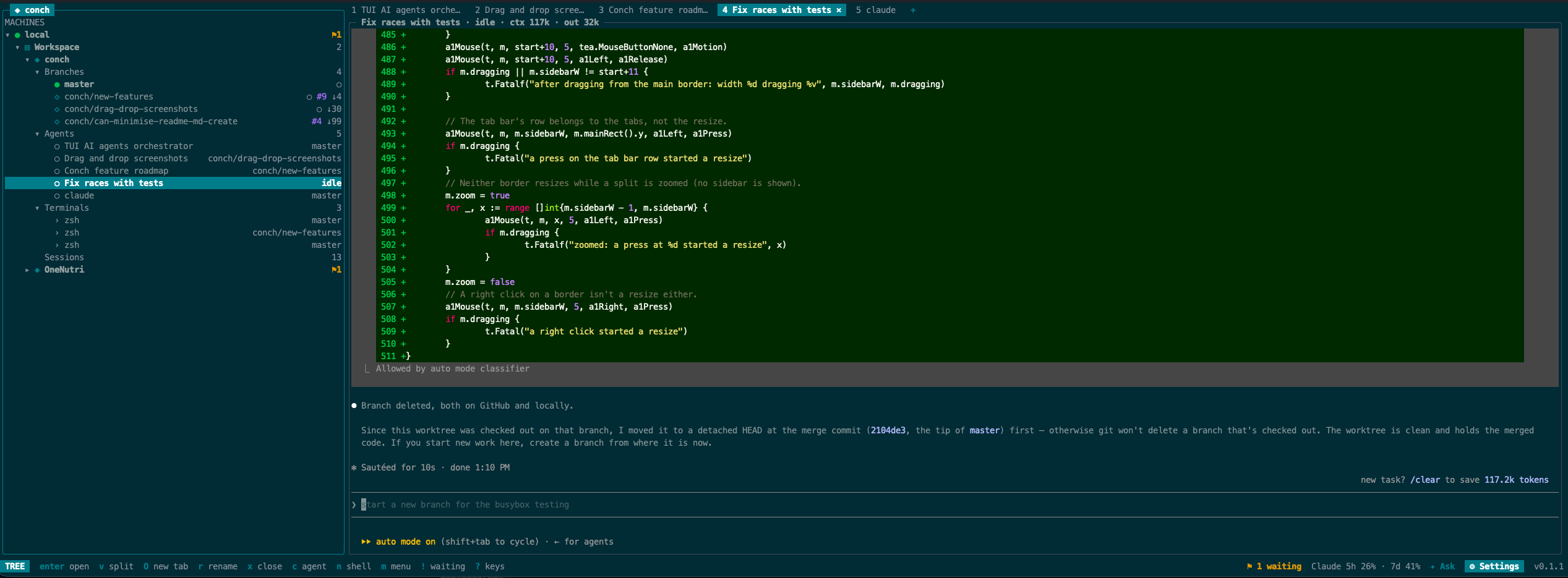
Selecting an agent shows its live terminal, with state and token usage in the title.
- 5
- coding agents supported
- 1
- branch and worktree per task
- 0
- agents stopped when you quit the UI
- ssh
- is all a remote machine needs
what you get
Everything your agents are doing, in one tree
Machines, projects, git branches, agents and terminals sit beside a live view of whatever you select. Every card links to its docs.
Agents outlive the UI
A background server owns every pane. Detach, close the laptop lid, come back — the agents kept going.
q detach · conch reattachagentsKnow who needs you
Working, waiting, done or idle for every agent — from hooks, screen rules and the foreground process, most reliable first.
! next agent waitingagentsNotifications, quiet hours, snooze
Desktop notification, sound or bell when an agent waits or finishes. Silence them overnight or for an hour.
, settings → notificationsagentsToken usage and plan limits
Context, output and cost in each pane's title. Claude's and Codex's 5-hour and weekly windows in the status bar, with an alert once they pass 80% and 95%.
Claude 5h 82% · 7d 31%agentsSessions: resume, search, share
Every saved conversation for a project across all four agents. Search inside them, resume one, or hand one to a different agent to continue.
/ search · s share · I resume allworkflowOne worktree per task
Describe the task: conch names a branch, checks it out into its own worktree and starts the agent with your prompt.
conch task "Fix the flaky tests"workflowYour .env comes along
New worktrees get the main checkout's gitignored local files — .env, .envrc, local agent settings — never untracked ones.
F edit the patternsworkflowAsk in plain words
“Start 3 agents on api: …” becomes a checked plan of tasks and messages. Nothing runs until you press enter.
: ask · conch ask "…"workflowBroadcast to a group
One message to every agent in a project, branch or machine — or one command to its terminals. Waiting agents are left out unless you tick them.
B broadcastworkflowtmux keys, splits and tabs
tmux's splits, tabs, layouts, split numbers and synchronized typing. Tabs follow the tree selection; 10,000 lines of scrollback with copy mode and OSC 52.
ctrl+b % · ctrl+b space · ctrl+b qworkflowScriptable
Everything in the TUI is a command, locally or on any machine. The server speaks newline-delimited JSON over a unix socket.
conch send p1 "…" · conch read p1gitBranches at a glance
Uncommitted lines, conflicts, commits ahead and behind the base, and which agents work on each branch.
+42 −7 ↑2 ↓1gitPull requests and checks
PR state and checks from your gh login, refreshed every minute while agents work. A changes view with diffs for every branch.
#12✓ o open PRgitSee what an agent loads
Instructions, skills, MCP servers and plugins each agent picks up in a folder — and what a worktree is missing from the main checkout.
i agent setupremoteRemote machines over ssh
Add any host from your ssh config. conch installs itself there and its server keeps agents running when your network drops.
conch machine add gpu-boxremoteUpdate without stopping agents
The server execs a new build in place: panes, scrollback and agent states survive, and every connected machine updates with one key.
conch server reloadthe interface
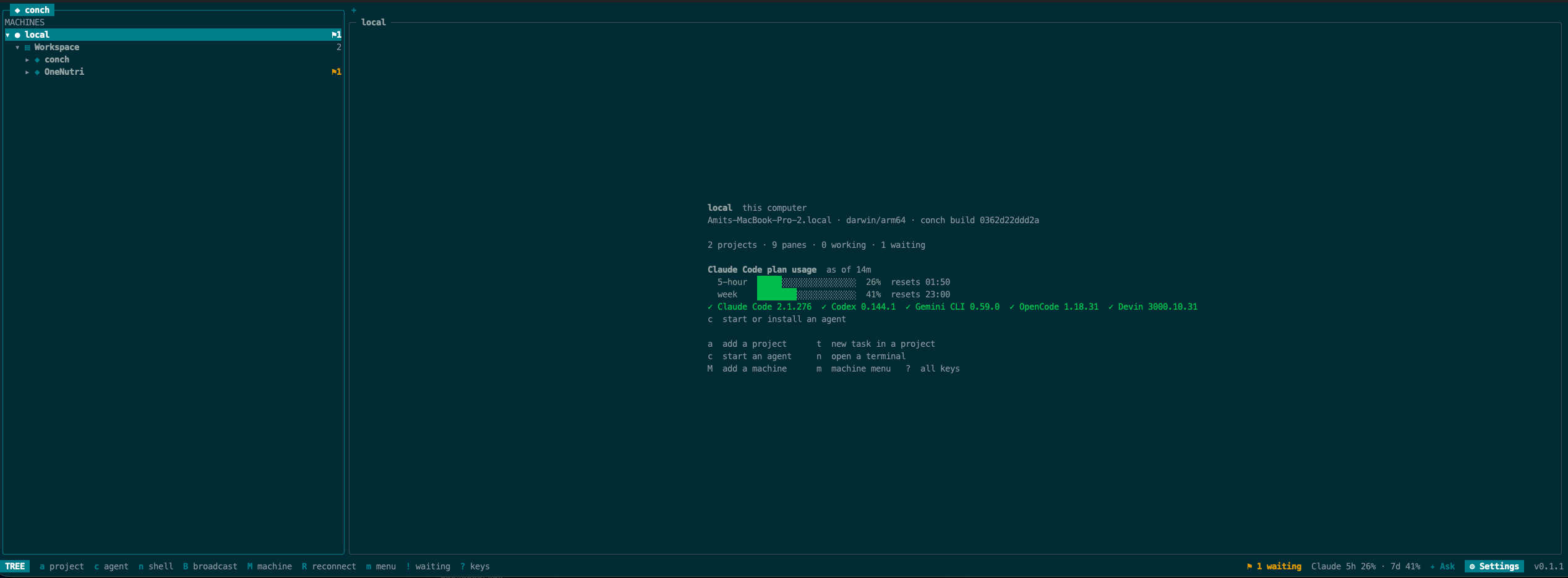
One tree, whatever you point it at
Select a machine to see what it is running and what the agents there have spent; open a project and it unfolds into branches, agents and terminals, each with its own tab.
a day with conch
Hand out the work, then stop babysitting it
The loop conch is built for: many small tasks, each on its own branch, and you only step in when an agent asks.
- 01
Start a task
Press t on a project and describe the work. conch names a branch from the prompt, checks it out into its own worktree, copies your local files and starts the agent.
$ conch task -cwd ~/src/api "Add a health check endpoint" - 02
Start a few more
Each task is isolated from the others, so agents never trip over each other's changes. Ask the brain to split a list of work into tasks, or press B to send every agent one instruction.
$ conch ask "start 3 agents on api: fix the flaky test, add rate limiting, update the README" - 03
Get on with your day
Detach with q. The tree shows who is working and who is waiting; a notification fires when an agent you aren't watching needs you, and ! jumps straight to it.
$ conch status - 04
Review and ship
Select a branch to see its uncommitted files, commits ahead, diffs and pull request checks. o opens the PR; x removes the worktree when you're done.
$ conch read p1
how it works
The UI is disposable. The server is not.
Every machine runs its own conch server, which owns the terminals your agents run in. The TUI is only a client: quit it, lose the network, reboot your laptop — the agents on the other side keep going.
your laptop
conch
the TUI — a client you can quit any time
conch server
owns panes, tracks git, PRs and agent states
gpu-box (remote)
conch bridge
started over your normal ssh; no secrets stored
conch server
keeps running when your laptop sleeps
Panes live in the server
A PTY and terminal emulator per pane, with 10,000 lines of scrollback. Reattach from any terminal and pick up where you were.
State from the best evidence
Hooks first, then regexes over the screen, then the foreground process. conch agent explain shows why an agent is in its state.
Reload in place
conch server reload execs a new build keeping its process ID, terminals and socket — agents never notice the upgrade.
Reach it from a phone
conch web serves the same agents to a phone over your own tailnet — see what each is doing, answer the question it is waiting on, type into a terminal. No service of conch's in between.
bring your own agents
Works with the agents you already use
conch launches each agent with its own login and configuration, and never edits that configuration or answers its trust prompts for you. A missing agent installs from the same menu — no root needed.
| Agent | How conch knows its state |
|---|---|
| Claude Code | hooks, the screen, and usage from the transcript curl -fsSL https://claude.ai/install.sh | bash |
| Codex | the terminal title and the screen curl -fsSL https://chatgpt.com/codex/install.sh | sh |
| Gemini CLI | hooks in trusted folders, the title and the screen npm install -g --prefix ~/.local @google/gemini-cli |
| OpenCode | plugin events (busy, idle, permission, question) and the screen curl -fsSL https://opencode.ai/install | bash |
| Devin (preview) | recognised by its process; its working and waiting states aren't read yet curl -fsSL https://cli.devin.ai/install.sh | bash |
agent states
working
the agent is busy
waiting
blocked on you — a permission or question
done
finished while you looked elsewhere
idle
waiting for a prompt
the brain
Say what you want. Approve the plan.
Press : and ask in plain words. The brain sees every machine, project, branch and agent, proposes actions with checkboxes and marks the ones that can't run. Nothing runs until you press enter.
Providers: the Claude Code CLI with your existing login (the default), the Anthropic API, or any OpenAI-compatible endpoint — including a local Ollama.
Summaries: press S on an agent for a one-line summary of what it is doing and what it needs from you, or turn on automatic summaries.
Read about the brainGive your agents a place to work
Install conch, run conch, and press t on a project.