Getting started
Moving from Conductor
Conductor has joined Meta. It stopped sign-ups and downloads on November 4, 2026, Conductor Cloud went read-only on November 13, and it shuts down on November 20, 2026. This page moves your work to conch: your workspaces, your setup script, and the Claude Code and Codex conversations you had in them.
conch does the same job — several agents in parallel, each on its own branch and worktree, with the diff, the pull request and its checks beside them — and it is open source (Apache 2.0), so it cannot be shut down from under you.
Do step 1 before November 20. After that, what is only in a Conductor Cloud workspace is gone.
Moving over
These steps use the terminal. Prefer the Mac app? Follow Moving over in Conch.app instead.
Get your work out of Conductor Cloud
For every cloud workspace you want to keep, transfer it to your Mac or export it from Conductor. Anything already committed is safer still pushed:
git push -u origin HEAD # in each workspace whose branch matters
Local workspaces need nothing: they are git worktrees on your disk, and conch reads them as they are.
Install conch
curl -fsSL https://raw.githubusercontent.com/Amitgb14/conch/master/install.sh | sh
Or brew install Amitgb14/conch/conch. Other ways are on Installation; conch doctor checks what conch needs.
Add your repository
conch project add ~/src/app      # the repository Conductor worked in
conch                            # open the TUI
conch lists a project's branches from git worktree list, so each Conductor workspace shows up as a branch with its worktree, its changes and its pull request. Not sure which folder that is? Run git worktree list in a Conductor workspace: the first line is the repository to add.
Bring your conversations
Conductor kept its conversations in its own database, not where Claude Code and Codex keep theirs, so conch reads them from there. In Conch.app: Integrations → Import → Conductor → Import…, then choose which come over. From a terminal:
conch import conductor
Each Claude conversation resumes in Claude Code: from the session Claude Code kept itself while Conductor ran it, when its workspace is still there, and otherwise written as a Claude Code session, tool calls and all, where it ran — the repository when the workspace is gone — and it shows in the Sessions view like any other, once. The import also adds each repository the conversations ran in to conch as a project, if it is not one already, so the step above is done for you. The command prints how to carry each one on:
conch new -agent claude -cwd ~/src/app -- --resume ID
A Codex conversation resumes in Codex: Conductor ran Codex on this Mac, and Codex kept its own session of it, so the import finds that and prints conch new -agent codex -cwd DIR -- resume ID. Only when Codex has no session of it here does it become a Markdown file under imports/conductor/ in conch's folder — your prompts and the agent's answers — with the command that starts an agent where it ran and tells it to read the file. -markdown writes that file for the Claude ones too.
Run it before you delete Conductor: the database goes with the app. A cloud workspace's conversation is kept on Conductor's servers, so transfer the workspace to your Mac first (step 1). Running it again later brings in only what is new. -n lists what it would write, with each conversation's id for -ids; see it step by step, or more.
Bring your setup script
conch runs a setup command in every new worktree. Paste in what you had under Settings → Scripts, with conch's variables in place of Conductor's:
conch project ls                                  # the project's ID
conch project setup ID 'pnpm install && pnpm run build'
Or keep your script unchanged and hand it the names it expects:
conch project setup ID 'CONDUCTOR_ROOT_PATH="$CONCH_ROOT" \
  CONDUCTOR_WORKSPACE_PATH="$CONCH_WORKTREE" \
  CONDUCTOR_WORKSPACE_NAME="$CONCH_BRANCH" \
  CONDUCTOR_PORT="$CONCH_PORT" ./script/setup.sh'
You can usually drop cp "$CONDUCTOR_ROOT_PATH/.env" .env: conch already copies .env, .env.*, .envrc, .claude/settings.local.json, .mcp.json and similar local files into each new worktree. F on the project changes which (Local files).
Start a task
t on the project, or:
conch task -cwd ~/src/app "Add a health check endpoint"
A branch, a worktree, the setup command, and an agent working in it. Press q to detach: the agents keep running.
Your conversations, step by step
What step 4 looks like from the terminal, recorded against a made-up Conductor: a small shop called storefront with conversations in two workspaces, and a marketing site whose repository has since been deleted. The whole run is a recording you can play with asciinema play, and web/scripts/import-demo/capture.sh makes it again.
The importer is an integration, like a CI provider or a sandbox: find it in the registry and see what it reads.
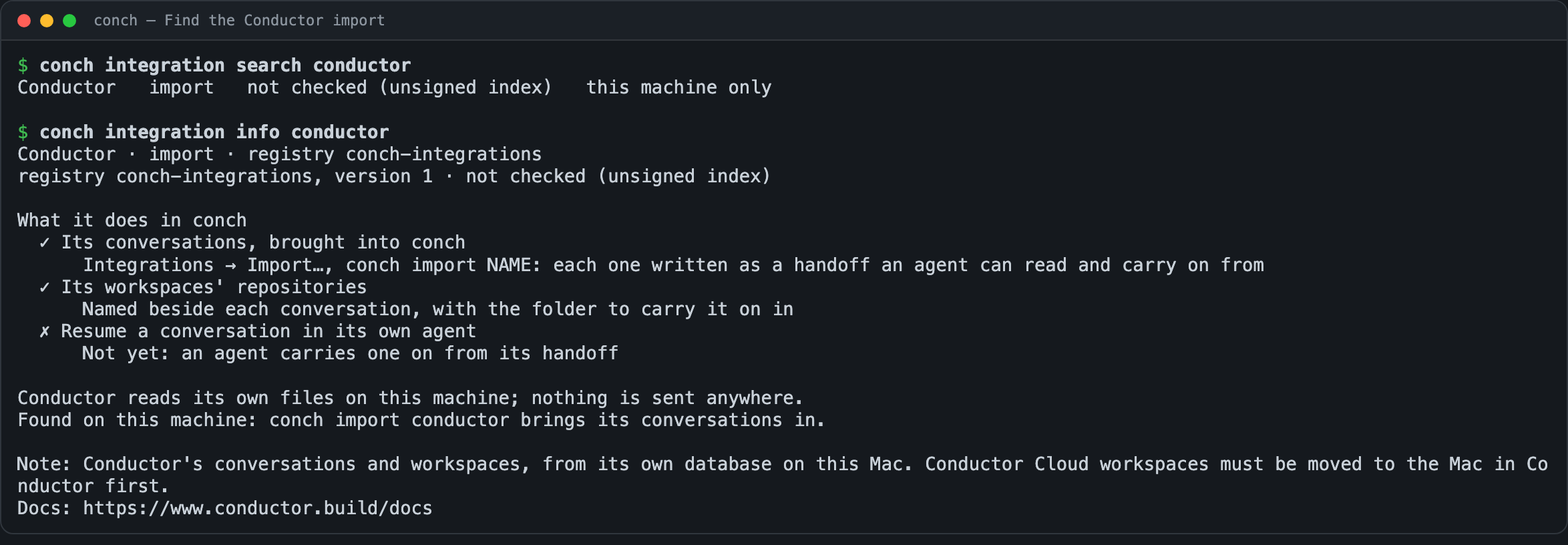
Install it. It has no key and talks to nothing, so it only asks once.

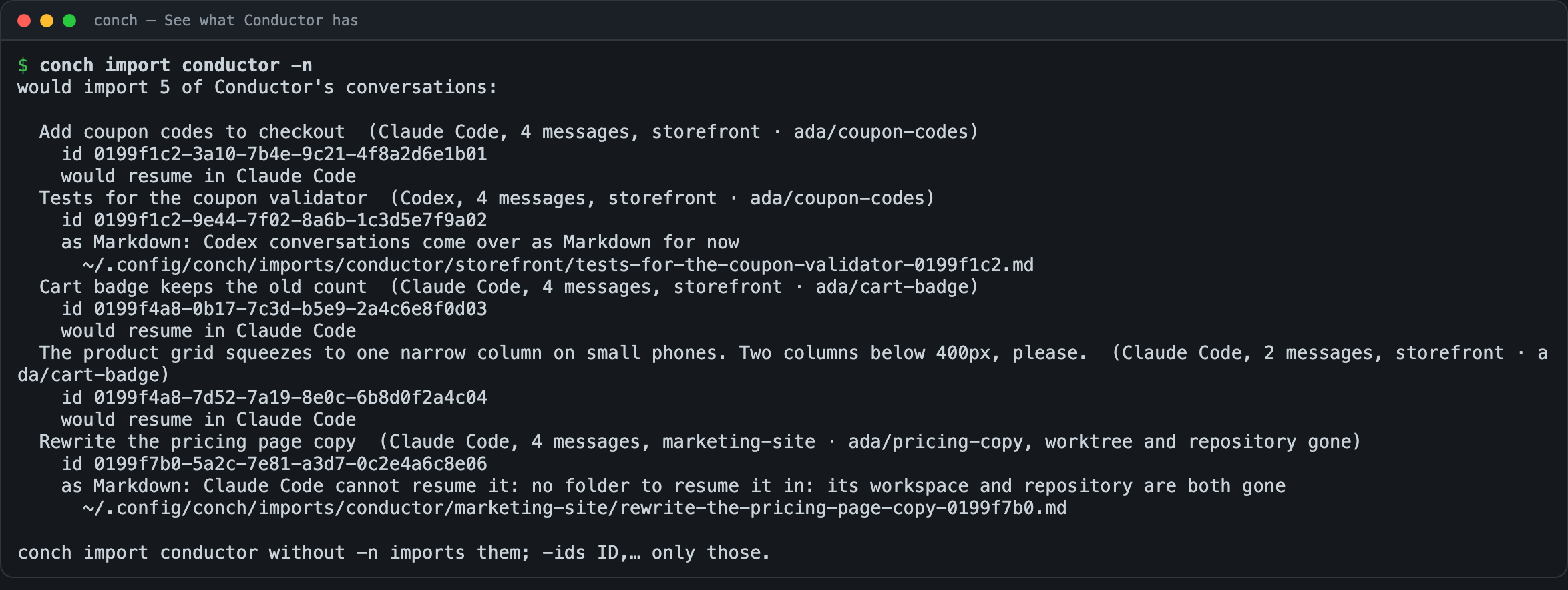
-n lists every conversation with something said in it, each with its id, its agent, its repository and branch, and how it would come over: a Claude conversation resumes in Claude Code, a Codex one in Codex; one whose worktree and repository are both gone, or a Codex one Codex has no session of, comes over as a Markdown file. Nothing is written yet.
Name the ones you want with -ids (or leave it off for all of them). Each Claude conversation is written as a Claude Code session where it ran, with the command that resumes it; the rest become Markdown files. The repository they ran in is added to conch as a project.
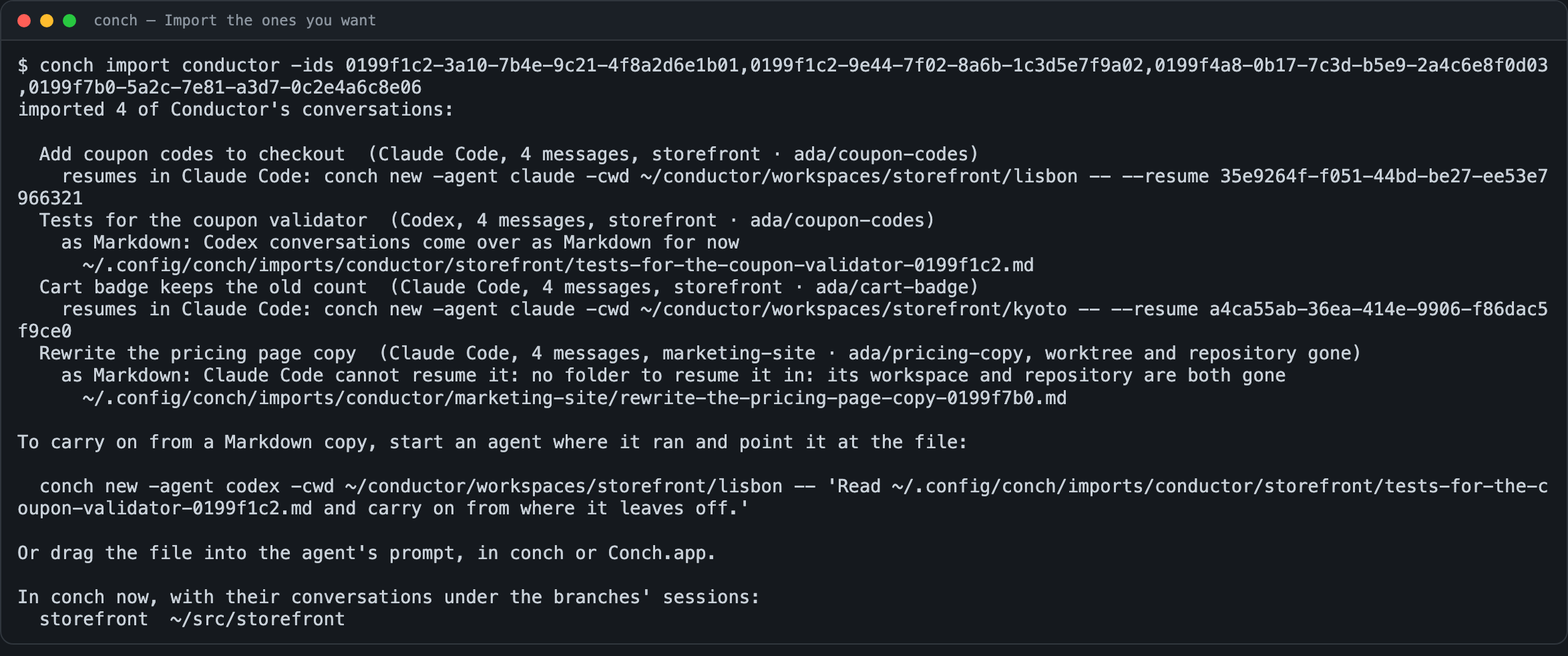
The repository is a conch project now, and Conductor's workspaces are its branches, since they are git worktrees. Each branch's conversations are in its sessions.

Run the command the import printed: Claude Code starts in the Conductor workspace and resumes the conversation, with its history. In the recording a stand-in plays Claude Code and only shows what it was started with, so no model was called.

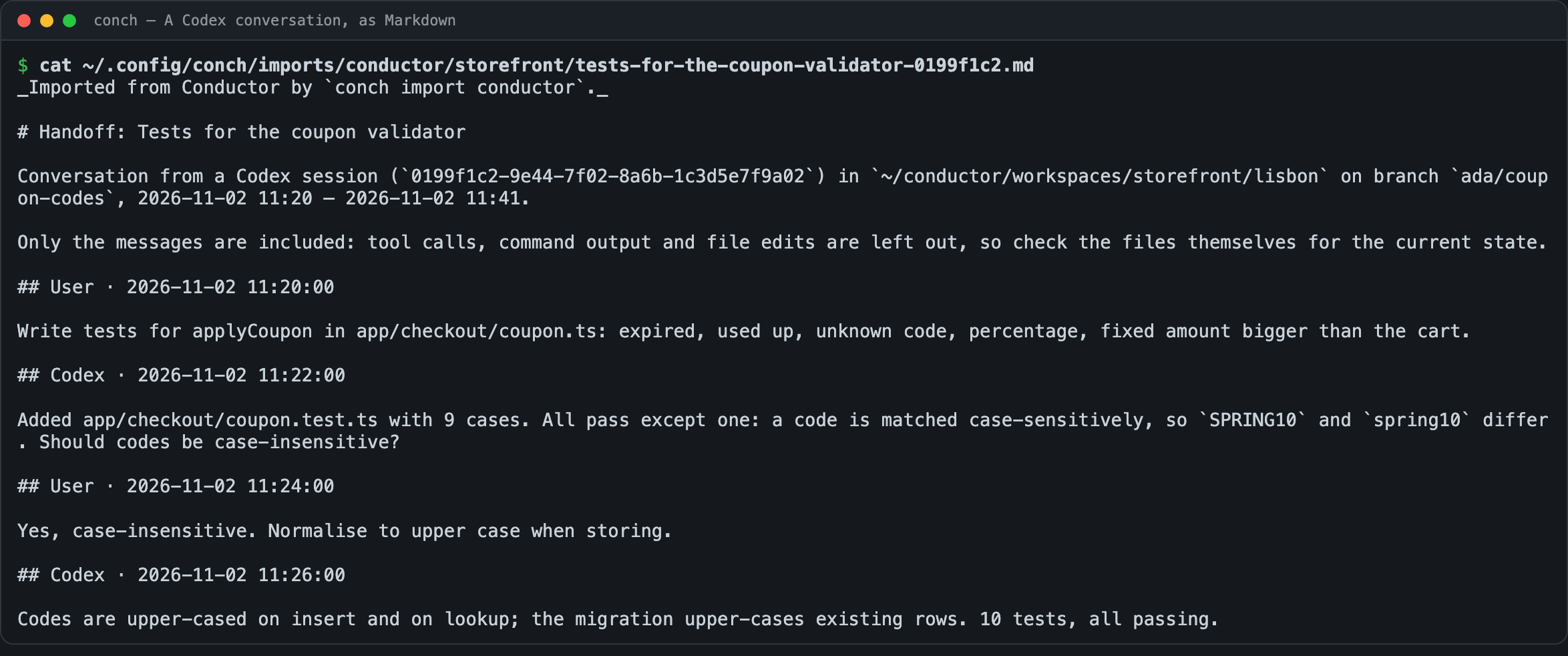
A Codex conversation Codex has no session of here is a handoff: where it ran, on which branch and when, then your prompts and the agent's answers. Tool calls, command output and thinking are left out, and the file says so, so the agent reads the code for the current state. Start an agent where it ran and tell it to read the file, as the import says.
Prefer a window? Conch.app
If you liked Conductor because it was a Mac app, Conch.app is conch in a native macOS window: the same agents, branches and terminals as the TUI, since both are clients of the same server. Closing it stops nothing.
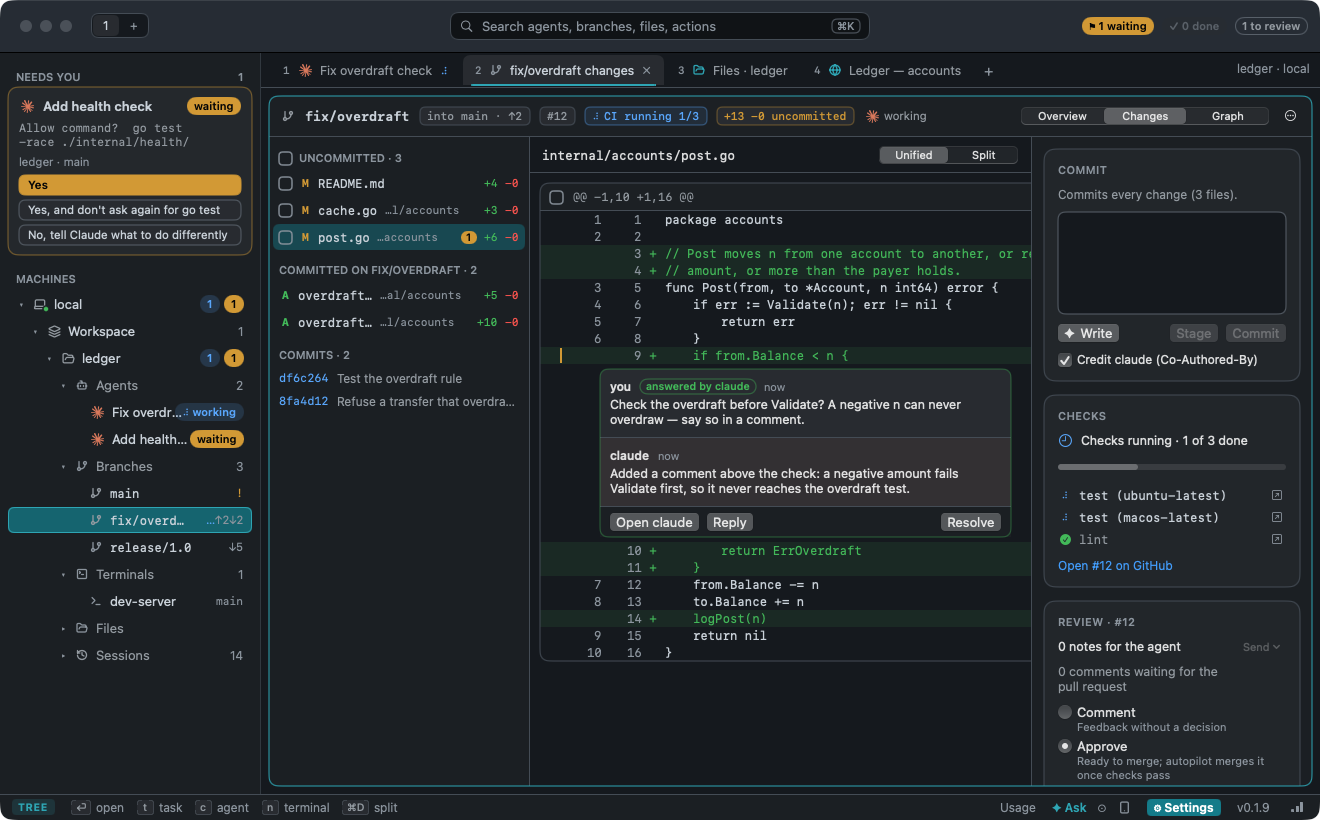
A branch's changes open in a tab, like Conductor's diff viewer. Tick hunks and commit, leave the agent a note on a line, and follow the pull request's checks beside them.
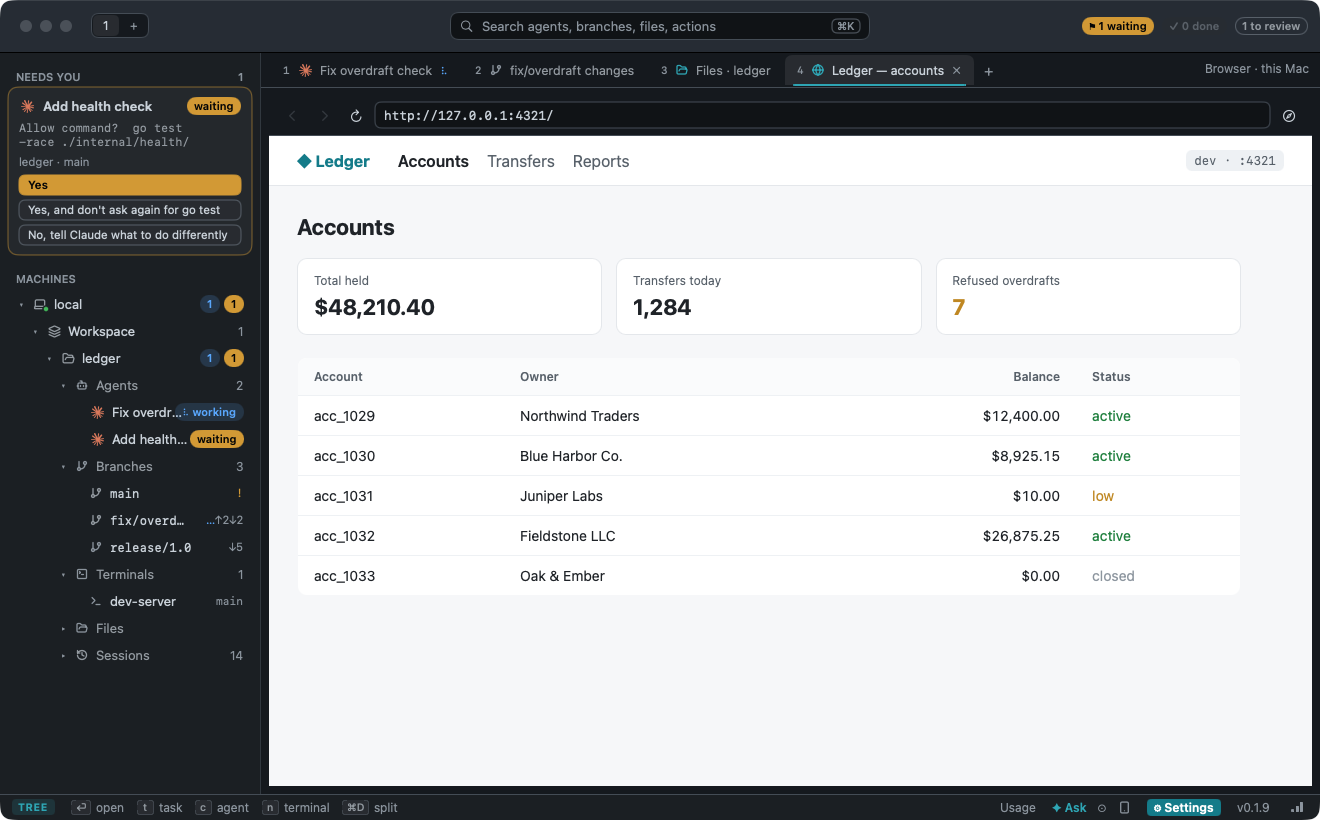
The dev server's page sits in a tab too (⇧⌘B), where Conductor had its Run button: start it on $CONCH_PORT in a terminal and open the page beside the agent that is changing it.
It is in beta: a few things are still the TUI's alone (Mac app).
Moving over in Conch.app
The same move, without the terminal. Every menu below is also on a row's right-click menu in the sidebar.
Get your work out of Conductor Cloud
As in step 1 above: transfer or export each cloud workspace before November 20, and push the branches that matter.
Install Conch.app
Download Conch_<version>_macos_arm64.dmg from the latest release, open it and drag Conch into Applications. It needs Apple Silicon and macOS 14 or later.
The app carries conch inside it and starts the server itself, so there is nothing else to install. Conch → Check for Updates… keeps it current.
Add your repository
File → Add Project… (⌘O) and choose the repository Conductor worked in.
The project appears in the sidebar under local. Open its Branches: each Conductor workspace is there, since it is a git worktree.
Bring your conversations
Conductor kept its conversations in its own database. Open Window → Integrations, choose Import in the sidebar, and on the Conductor card (it says Found on this Mac) press Import…. The sheet lists the conversations by workspace; untick any you don't want and press Import.
Each Claude conversation resumes from the Claude Code session Claude kept itself while Conductor ran it, or is written as one in its project when there is none: it is in the branch's sessions, and resumes from there like any other. The import also adds each repository the conversations ran in to conch as a project, if it is not one already, so the step above is done for you. A Codex conversation resumes in Codex, from the session Codex kept itself. One Codex has no session of becomes a Markdown file under ~/.config/conch/imports/conductor/; to carry one on, start an agent on its branch (right-click the branch → Start an Agent on This Branch) and use Copy Prompt from the list, or drag the file into its prompt. A Claude or Codex conversation whose workspace and repository are both gone has nowhere to resume, so it comes over as a file too; Resume In… on its row asks for a folder — a fresh clone of the repository, say — and resumes it there. After Done, the Conductor page under Integrations → Import keeps that list, under Imported. Do this before you delete Conductor: the database goes with the app.
Bring your setup script
The app has no screen for the setup command yet, so set it once from a terminal in the app: right-click the project → Open Terminal in Project, then
CONCH=/Applications/Conch.app/Contents/Resources/conch   # or just conch, if you installed it
$CONCH project ls                                        # the project's ID
$CONCH project setup ID 'pnpm install && pnpm run build'
Your .env and similar local files are copied into each new worktree without it. The variables are the same as above.
Start a task
File → New Task… (⌘N), or right-click the project → New Task in Project…, and describe the work. conch makes the branch and worktree, runs the setup command and starts the agent.
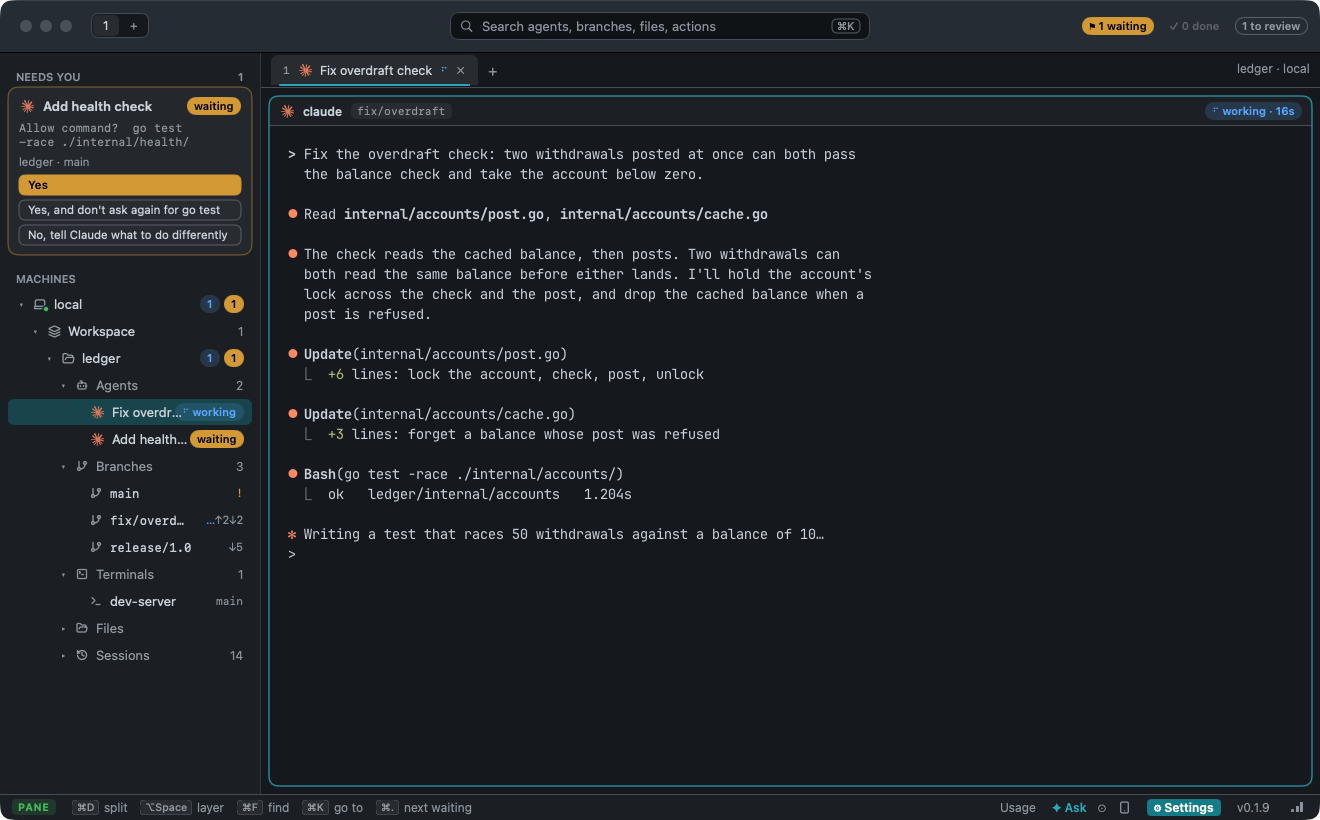
When an agent needs you, it shows as a card under Needs you at the top of the sidebar. Click an answer there, or ⌘. to go to the next waiting agent.
Review and open the pull request
Click the branch to open its changes in a tab. Tick hunks and Commit (✦ Write drafts the message), or + on a line to leave the agent a note. ⋯ → Open Pull Request pushes it, and its checks show beside the diff.
Run the dev server
Right-click the branch → Open Terminal on This Branch and start the server on its own port:
pnpm dev --port $CONCH_PORT
Then File → New Browser Tab (⇧⌘B) and open http://localhost: with that port, beside the agent.
Keep agents going with the laptop closed
Quitting the app stops nothing; sleeping the Mac does. To keep going with the lid shut, right-click local in the sidebar → Add Machine… for a box you can ssh to, or New Sandbox… for one at a provider. Then right-click the project → Move to Another Machine…: its worktrees, uncommitted work and agents go with it.
What maps to what
| In Conductor | In conch |
|---|---|
| Workspace | A task: its own branch and worktree (t, conch task) |
| Setup script | Setup command (conch project setup) |
CONDUCTOR_ROOT_PATH | CONCH_ROOT |
CONDUCTOR_WORKSPACE_PATH | CONCH_WORKTREE |
CONDUCTOR_WORKSPACE_NAME | CONCH_BRANCH — a branch name, which can hold a / |
CONDUCTOR_PORT (ten ports) | CONCH_PORT (ten ports), in every terminal of the checkout |
| Run button | A terminal in the worktree (n) running pnpm dev --port $CONCH_PORT; L opens it in the browser |
| Archive script | None yet: run it yourself before removing a worktree (D) |
| Diff viewer | A branch's changes: hunks to stage, commit, notes on a line the agent answers |
| Pull request and checks | p opens the pull request; a failed check goes back to the agent with its log |
| Parallel agents | conch task -n 3 "…" or -agent claude,codex; A compares the attempts |
| Chat history | conch import conductor: Claude conversations resume in Claude Code, Codex ones in Codex |
| Claude Code, Codex, OpenCode | Supported, with their sessions — and Gemini CLI, Copilot CLI, Devin and more |
| Cursor | Cursor CLI runs in conch, its chats listed in Sessions |
| The Mac app | Conch.app (beta), the TUI and your phone — clients of the same server |
| Conductor Cloud | Your own machine over ssh (Remote machines) or a sandbox |
Agents that keep working with the laptop closed
That was Conductor Cloud's job. In conch, a machine is a machine: run agents on any box you can ssh to, or let conch make a sandbox at a provider such as Daytona.
conch machine add devbox                  # any machine you can ssh to
conch project move app -to devbox         # worktrees, uncommitted work and agents, moved there
Then close the laptop. conch web puts the same agents on your phone, with a waiting agent's question and its answers as buttons (Phone).
What is different
- The terminal came first. The TUI does everything; Conch.app is another window onto the same agents, in beta, and the phone a third.
- Your agents outlive the window. A background server owns the terminals, so quitting the TUI or the app stops nothing.
- No account. conch talks to your git, your
ghand your agents' own sign-ins. Nothing goes through a service of ours. - macOS and Linux. On Windows, WSL.
Something missing that you used every day in Conductor? Open an issue — moving people over is what this page is for.